If you're experimenting with OrderCloud then getting a sandbox instance is an important part of the discovery process. Unlike most of Sitecore's products, this one is available free to anyone (just register in the portal) - so it's easy to give it a try. But if you want to build an experiment against the sandbox instance you need your code to authenticate with it. And this has tripped me up a couple of times because it's not wildly well documented. So learn from my frustration...
Edited to add: After I published this the OrderCloud team went back and made some edits to the documentation. The information below remains valid, but hopefully it's a bit more obvious from official sources now...
The challenge
 url copied!
For us back-end devs there's a
helpful Nuget package available
to simplify connecting and calling methods against the APIs. Your code works with an
OrderCloudClient
object which manages all the business of authenticating the API calls. And if you
look a the Github repo for this library
you'll see an example for connecting that looks like this:
var client = new OrderCloudClient(new OrderCloudClientConfig {
    ClientId = "my-client-id",

    // client credentials grant flow:
    ClientSecret = "my-client-secret"

    // OR password grant flow:
    Username = u,
    Password = p,

    Roles = new[] { ApiRole.OrderAdmin }
});
But if you try to use this to connect as a user or a client on your sandbox instance it won't work... You'll get one of a variety of connection errors depending on exactly what credentials you send in the different fields it shows. And it's not entirely clear which of these are required in which circumstances. But broadly you're likely to see an
invalid_client
error if your account is on a sandbox.
The solution
url copied!
It's pretty obvious when you stop to think about the error for a second - we've not told the client object which server to authenticate against - so it's probably defaulting to the production endpoints. And that's not where your data is...
But without a bit of googling it's not entirely obvious how you solve this. The repo's readme doesn't actually mention it, but there are two properties you need to set if you want to connect to a sandbox.
Looking at the source they are:
/// <summary>
/// The root URL of the OrderCloud API. You should not need to change this from the default.
/// </summary>
public string ApiUrl { get; set; } = "https://api.ordercloud.io";
/// <summary>
/// The root URL of the OrderCloud authorization server. You should not need to change this from the default.
/// </summary>
public string AuthUrl { get; set; } = "https://auth.ordercloud.io";
Ironically the source says you should not need to change these - but you do in this situation. And you have to set both of them to match your sandbox's location for it to work. And you can get the right value from the portal UI:
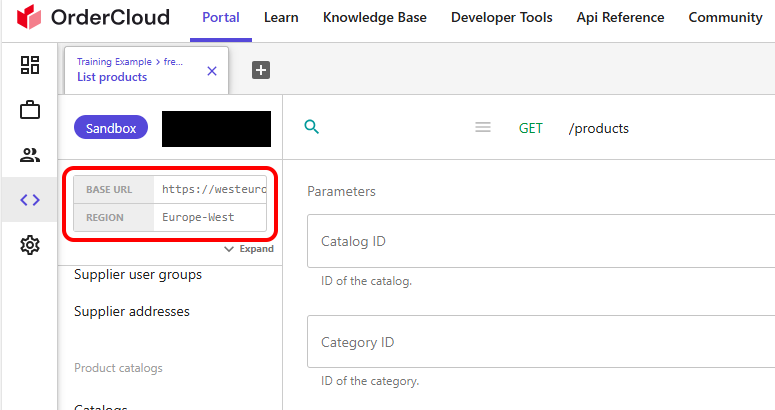
The "BASE URL" here is the value that needs to be supplied for both of these properties.
So for my sandbox, and to connect successfully to a client, the connection example ends up looking more like: (with my secrets redacted, of course)
var client = new OrderCloudClient(new OrderCloudClientConfig {
    ApiUrl = "https://westeurope-sandbox.ordercloud.io",
    AuthUrl = "https://westeurope-sandbox.ordercloud.io",

    ClientId = "11111111-2222-3333-4444-555555555555",

    GrantType = GrantType.ClientCredentials,
    ClientSecret = "1234567890abcdefhhijklmnopqrstuvxyz",

    Roles = new[] { ApiRole.BuyerAdmin, }
});
And that connects without any errors...
↑ Back to top