Jeremy Davis
Sitecore, C# and web development
This is post 4 of 4 in a series titled Text adventures
- Text adventures: Starting with a world
- Text adventures: The player's commands
- Text adventures: Behaviours for flavour
- Text adventures: A worked example
Following on from the general framework bits in the previous posts about building a text adventure, what needs doing to create an example game? Here's an explanation of the example repo game to show how it all goes together. [ Spoiler warning - if you want the fun of playing the example game, don't read this post before you play, as it explains some of the puzzles.]
 url copied!
Before getting into the meat if it, there are a few small quality-of life features that it's worth having on top of what's been discussed before:
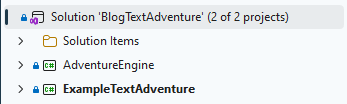
public static class ExampleSetup
{
    public static World Initialise()
    {
        var world = new World();

        // setup the rooms, characters, items, etc...

        return world;
    }
}
And that can be called in the
process of running the game:public class GameRunner
{
public void Run(Func<World> init)
{
Console.WriteLine("Initialising world...");
var world = init();
// run the game
}
}
Similarly to the first point, this makes reuse of code easier.Behaviour
and
Command
classes you create might get large. Hence individually registering these can become a bit of a hassle. So this is perhaps a place to
make use of some reflection to find them all automatically
For example - for commands:public static World RegisterCommands(this World world, Assembly dll)
{
var cmds = dll.GetTypes().Where(t => t.IsAssignableTo(typeof(Command)));
foreach (var cmd in cmds)
{
var constructor = cmd.GetConstructor(Type.EmptyTypes);
if (constructor != null)
{
var command = (Command)constructor.Invoke(null);
world.Commands.Add(command.Name, command);
}
}
return world;
}
And these helpers can be called in
the initialisation of the game.But with that in place, on to the game itself...
url copied!
The example I tried was as follows: The player has arrived outside a country cottage. There's a road back to civilisation that the game won't let them take, and clues that they need to get a taxi to ride home. The cottage and its garden can be explored to find a phone and a person who is able to provide a taxi number if they're given a cup of tea.
The rooms and paths between them required might look like:
flowchart LR
  gate["Garden gate

(Start)
Sign describing
taxi pickup"]
  lane["Winding lane

back home"]
  taxi["Taxi

(End)
Driver to
pay"]
  path["Path"]
  step["Doorstep

Doormat has
hidden key"]
  hall["Hall

Ticking clock
and phone"]
  kitchen["Kitchen

Kettle etc
for tea"]
  bedroom["Bedroom

Old man to
give cup and
exchange tea for
taxi number"]
  patio["Patio"]

  gate-- (E) not
walkable -->lane
  gate<-- (N/S) only after
phoning taxi -->taxi
  gate<-- (E/W) -->path
  path<-- (E/W) -->step
  step<-- (E/W) only after
finding key -->hall
  hall<-- (U/D) -->bedroom
  hall<-- (E/W) -->kitchen
  kitchen-- (E) not
walkable -->patio
Implementing this will need a few things:
The hidden state is fairly easy. Entities need a new property to indicate if they should be displayed:
public bool Visible { get; set; } = true;
And it's helpful to have helpers to make constructing or updating entities with that flag:
public static T IsNotVisible<T>(this T entity) where T : Entity
{
    entity.Visible = false;
    return entity;
}

public static T IsVisible<T>(this T entity) where T : Entity
{
    entity.Visible = true;
    return entity;
}
And with that in place the commands which interact with these entities can apply a filter. You can't interact with something in the hidden state, so there are various places to add a filter to avoid showing them, like the
look
command and how it lists out exits:
var visibleExits = r.Exits.Where(e => e.Value.Visible);
if (visibleExits.Any())
{
    world.Display("Exits:");
    foreach (var exit in visibleExits)
    {
        world.Display($"  To the {exit.Key} is {exit.Value.Article} {exit.Value.Name}");
    }
}
And commands like
get
need to have things like the calls to
MatchEntity()
filtered too, so that even if the player knows an item should be there, they can't get it until the puzzle has been solved appropriately:
public static bool MatchEntity<T>(T entity, string name) where T : Entity
{
    if(entity.Visible)
    {
        // do the name-based matching
    }

    return false;
}
So following the "helper" patterns from the first post in this series, the world can be set up with calls like:
var doorstepRoom = world
    .CreateRoom("The", "doorstep",
        """"
        The cottage looked quite quaint from a distance, but up close it's a bit more run down. There's peeling paint on the door and mud on the ground.
        A pile of leaves have collected in the corner, and flutter about occasionally with gusts of wind.
        """"
    )
    .AddBehaviours("bell", "frontdoorlock")
    .AddItemInRoom(matItem)
    .AddItemInRoom(keyItem)
    .AddItemInRoom(bellItem);
The order entities get created in are important here - you have to have created the underlying entity for "the doormat" ('matItem') before you can add it into the 'doorstepRoom'. Sometimes this requires a bit of thinking to get right.
url copied!
There are three places in the map where the player is prevented from moving in a direction they can see by game logic. For the "gate -> winding lane" and "kitchen -> patio" routes this is fairly simple: The direction exists and can be interacted with normally, but the player is never actually allowed to move that way.
So the logic here is pretty simple. It needs a behaviour which always outputs a message about why you can't go that way and returns a result of false. That will prevent the move command from succeeding, but allows all the other interactions to work. Something like:
public class GateMovementBehaviour : Behaviour
    {
        public GateMovementBehaviour() : base("gatemovement")
        {
        }

        public override bool Execute(Entity owner, World world, AdventureEngine.Scripts.Action action)
        {
            if (action is CanLeaveRoomAction clr && clr.FromRoom == owner)
            {
                if (string.Compare(clr.Direction, "west", ignoreCase: true) == 0)
                {
                    world.Display("It really was a very long walk down that lane to get here. You've no desire to do that again.");
                    return false;
                }
            }
        }

}
If the action being processed is
CanLeaveRoom
and the room being left is the one which owns this behaviour then check they wanted to go "west" (which would be off down the lane) and prevent it. This is basically the same logic being used to prevent movement from the kitchen to the patio.
The route through the front door is a little more complex. The puzzle here is to recognise the comment about the "lump" in the doormat and examine it. That reveals the lump to be a key, which can be picked up. Once the player is holding the key then they can pass through this door.
So we need two behaviours here. The first allows the key to become visible when examining the doormat:
public class DoormatBehaviour : Behaviour
{
    public DoormatBehaviour() : base("doormat")
    {
    }

    public override bool Execute(Entity owner, World world, AdventureEngine.Scripts.Action action)
    {
        if(action is HasExaminedItemAction hei)
        {
            var itm = world.Items.Where(i => i.Name == "key").First();
            if (itm.Visible == false)
            {
                world.Display("The lump is a key..");
                itm.Visible = true;
            }
            else
            {
                world.Display("There's no lump now - nothing else to find but some mud and dust.");
            }
        }

        return true;
    }
}
This is attached to the "doormat" item. It watches for the
HasExaminedItem
action (as you have to have completed that step for this to work - and maybe in a more complex game the player might have lost their glasses, which makes examining not work properly?) And then it makes the "Key" item visible if it's hidden, or displays a message reminding the player this has already been done.
And the second checks if the player is carrying the key to decide if they can move through the door or not:
public class FrontDoorLock : Behaviour
{
    public FrontDoorLock() : base("frontdoorlock")
    {
    }

    public override bool Execute(Entity owner, World world, AdventureEngine.Scripts.Action action)
    {
        if (action is CanLeaveRoomAction clr)
        {
            var rm = (Room)owner;
            var key = InputParser.MatchEntities(world.Player.Items, "key");

            if (clr.FromRoom == rm && clr.Direction == "east")
            {
                if (key == null)
                {
                    world.Display("The front door is locked. You'll need a key to get in.");
                    return false;
                }
                else
                {
                    world.Display("You open the front door with the key you found.");
                    return true;
                }
            }
        }

        return true;
    }
}
If the
CanLeaveRoom
action is being processed, and we're going from room that owns this script to the east, then the code checks if the player's inventory contains the key. If not, the action returns false to prevent the player moving. (The full code also includes a second check to see if the player is trying to move the other way through this door, and enforces the key for that as well, but for simplicity I've left that out of this snippet)
url copied!
The taxi room (and the route to it) don't appear until after the player has successfully made a phone call to the taxi company. This is a little more complex than the hidden key above, because the "call" command is something you can only do when you're both near the phone and holding the card with the phone number on it.
Having commands which are location-specific isn't complex. The code just needs to add and remove them as the player moves between locations:
public class PhoneBehaviour : Behaviour
{
    public PhoneBehaviour() : base("phone")
    {
    }
    public override bool Execute(Entity owner, World world, AdventureEngine.Scripts.Action action)
    {
        if(action is HasEnteredRoomAction)
        {
            world.Player.AddCommand("call");
        }

        if(action is HasLeftRoomAction)
        {
            world.Player.RemoveCommand("call");
        }

        return true;
    }
}
This gets attached to the room containing the "phone" item. When the player enters they are given the command, and it's removed when they leave. That helps to make the behaviour of the phone more obvious, as this verb is only visible in the
help
output in places where it's actually useful.
And the
Command
to handle that verb can implement the logic for the puzzle:
public class CallCommand : Command
{
    public CallCommand() : base("call", "call <thing> - phone someone, if you know the number.")
    {
    }
    public override void Execute(World world, string[] parameters)
    {
        if(parameters.Length == 0 || parameters[0].Length == 0)
        {
            world.Display("Call what?");
            return;
        }

        var card = InputParser.MatchEntities(world.Player.Items, "business card");
        if (card != null && string.Compare(parameters[0], "taxi", true) == 0)
        {
            world.Display("You phone the taxi company. They promise a car will arrive at the taxi waiting spot very soon.");
            world.Display("In fact, pretty much before you've had a chance to say thanks and put the phone down, you hear the crunch of gravel outside.");

            var taxiRoom = world.Rooms.Where(r => r.Name == "taxi").First();
            taxiRoom.Visible = true;
        }
        else
        {
            world.Display("What number would you even dial?");
        }
    }
}
In a situation where the game needed more general "phone" logic you might break the game logic here out to
Behaviours, and have the
Command
trigger
Actions when it's executed. But this scenario is simple enough that's not necessary. It can check for the right item being in the player's inventory and the right instruction being issued, and then make the taxi visible on the map.
It's worth noting that this might be a place where some more general logic for synonyms might be helpful. The logic here expects the word "taxi" for example - and maybe "cab" should work too? You can implement that with
or
clauses in the logic above, but it's a more general problem across the codebase which would benefit from a general solution.
url copied!
There are two places here where we need interaction with an NPC to trigger a response. (The same is true of items, but the NPCs here are the more interesting cases) The first instance here is the interactions with the old man, who can provide a cup and trade tea for the taxi card. His logic isn't complex, but he does multiple things so it's a bit longer:
public class OldManBehaviour : Behaviour
{
    public OldManBehaviour() : base("oldman")
    {
    }
    public override bool Execute(Entity owner, World world, AdventureEngine.Scripts.Action action)
    {
        // enter room reaction
        if(action is HasEnteredRoomAction her)
        {
            world.Display("The old man mumbles a greeting as you enter.");
            return true;
        }

        // hello reaction
        if(action is HasSaidAction hsa)
        {
            world.Display("In response, the old man mumbles something incomprehensible.");

            if (hsa.Message.StartsWith("hello", StringComparison.OrdinalIgnoreCase) ||
                hsa.Message.StartsWith("hi", StringComparison.OrdinalIgnoreCase))
            {
                var man = (Character)owner;
                var cup = InputParser.MatchEntities(man.Items, "cup");

                if (cup == null)
                {
                    world.Display("His mumbling includes something that looks like a mime of drinking from a cup.");
                }
                else
                {
                    world.Display("As he mumbles, he also hands you a cup. You think you make out the word 'tea' when he speaks.");
                    man.Items.Remove(cup);
                    world.Player.Items.Add(cup);
                    cup.Character = world.Player;
                }

                return true;
            }
        }

        // given tea - provide taxi card reaction
        if (action is HasGivenItemAction hga)
        {
            if(hga.ToCharacter == owner && hga.Item.Name.ToLower() == "tea")
            {
                var man = (Character)owner;

                world.Display("Yet more mumbling greets you handing over the tea.");
                world.Display("And it's followed by further excited mumbling as he presents you with a taxi card.");
                world.Display("You could call a taxi with that! Now, where did you see a phone?");

                var card = InputParser.MatchEntities(man.Items, "business card");

                if (card != null)
                {
                    man.Items.Remove(card);
                    world.Player.Items.Add(card);
                    card.Character = world.Player;
                }

                return true;
            }
        }

        return true;
    }
}
Firstly he respons with a clue when the player enters the room, by reacting to the
HasEnteredRoomAction. Secondly he responds to the
HasSaidAction
and checks if the player said "hello" or "hi" in response to the clue. If yes, then the logic moves the empty cup from the NPC's inventory to the player's. And finally, once the player has transformed the empty cup into a full cup of tea (in the kitchen's logic) the NPC will respond to the
HasGivenItemAction
for handing the tea to the man by moving the taxi card from the NPC's inventory to the players.
And the second instance of this interaction is ending the game by paying the taxi driver. That NPC has similar logic for providing clues when the player as entered the right room, and responding to
HasGivenItemAction
for the correct item. But in this case the result is setting the
world.Game.Running
flag to false after displaying some messages - ending the game.
url copied!
So there we have it. A simple framework for a text adventure, with a simple example game to play. As noted in previous posts, all the source for this example is available on GitHub for you to tinker with. (It will run in a CodeSpace if you don't want to bother downloading) What might you make?
↑ Back to top