
A colleague bumped into an interesting issue with SitecoreAI and Content Hub the other day, and it lead to a fun support conversation. If you're setting up your instance of Content Hub as the DAM for your SitecoreAI site, you might want to have a read...
The problem
 url copied!
When you set up the connector, and use the DAM image picker for an
Image
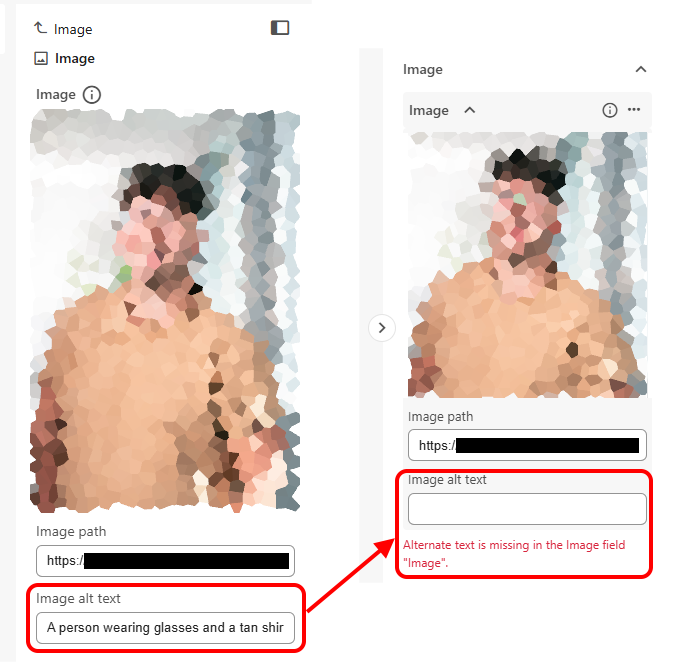
field in SitecoreAI, it shows you both the image you're selecting, and the alt-text that is associated with that.
But the issue we saw was that while you'd see the correct alt text in the picker UI as you chose your image, it would not get saved in your field correctly. As soon as you refreshed the Page Builder UI and re-selected the item containing the image field, the alt-text would be gone and a validation error would appear:
The solution
url copied!
After a bunch of head-scratching we ended up discussing this with Support, and their immediate suggestion was to change the settings in the DAM connector add-on for SitecoreAI.
The documentation for the "Sitecore Connect for Content Hub" module doesn't talk specifically about alt text, but
it does talk about mapping fields. It suggests a few things about the format of field names, which meant we'd set the mapping entry for "Alternative" to
SC.Asset.AltText
to match the relevant field. (That's also the answer the docs AI search was giving, when asked about making this mapping)
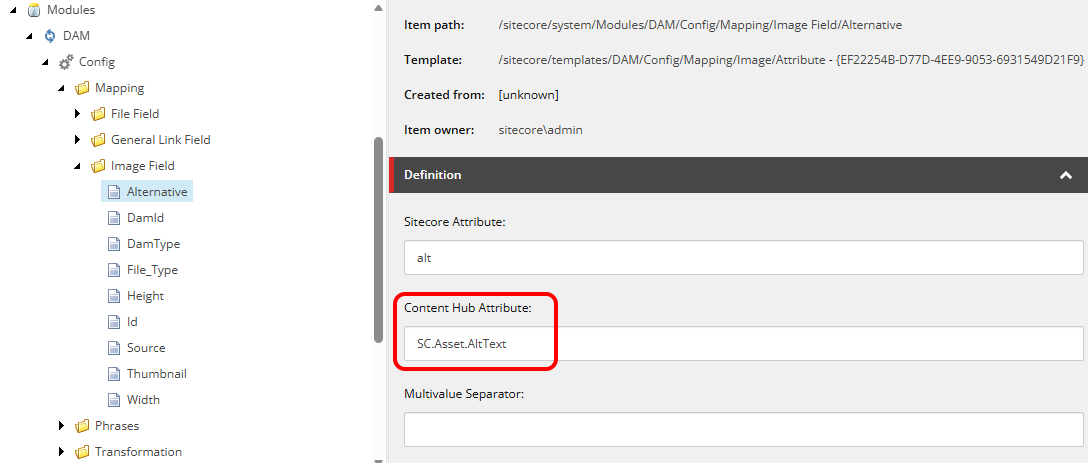
But support suggested changing this value to
alternative
- and this resolved our issue.
We've not had a clear answer yet on why the docs don't explain this, and this magic value is required to make it work. But the implication is that it may be related to changes to enable the new "SitecoreAI Media Library is being replaced with cut-down Content Hub" change that's being rolled out to customers who don't own the DAM currently. If I do get more detail then I'll add it here.
But in the mean-time, if you're using the full version of Content Hub for assets this may be a thing that could affect you too...
↑ Back to top