A colleague showed me something I'd not seen before about Azure DevOps wikis the other day, which kind of blew my mind. If you've not realised this either, maybe it can blow yours too...
When you're working on writing or editing big chunks of documentation or if you've got a lot of wiki info you need to feed into your favourite AI tools, the web interface to the wiki isn't great. Mass edits are a pain. And if you're using someone else's Devops instance, authentication can be a bit of a hassle too.
But it turns out you can just have markdown files to edit locally.
I did not realise that hiding in the menus for the DevOps wiki is a button to get the url for a git repo that contains all the wiki pages as markdown. So you can just clone the data as if it was code. And that lets you use your own local editor, or point automation tools at the local folder full of markdown files to have access to all the data really easily.
And it's simple to do once you know where to look. If you browse to your any page in your wiki, there's a little "vertical dots" menu button to the right of the name of the wiki on this page:
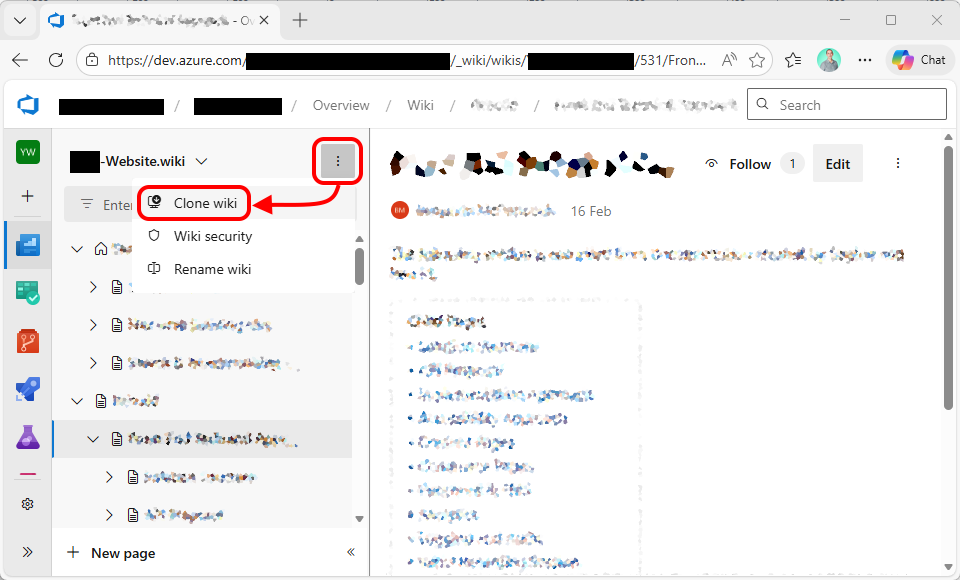
If you click the "clone" option here, it'll give you a dialog that provides the git repo link:
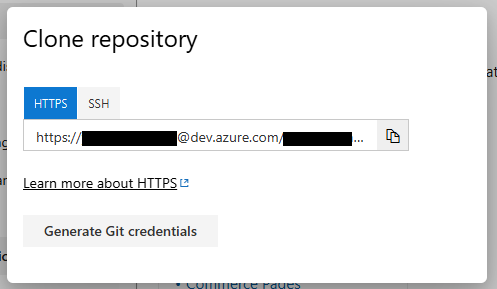
So you can copy that, and
git clone
the files with your preferred git CLI or visual tool - just as if it was just source code. And once you're done with any changes you need to make, just
git push
it back again.
It's Magic!
↑ Back to top