
Every so often Windows decides to throw an exciting new curveball. Recently it was the unexpected topic of "how does it align the content in your dropdown menu" that caught me out. This is just the sort of thing I'd forget if I didn't write it down, so here's what happened...
The issue
 url copied!
I sat down to write a blog post the other day, and when I clicked on the
File
menu of my editing tool it looked wrong:
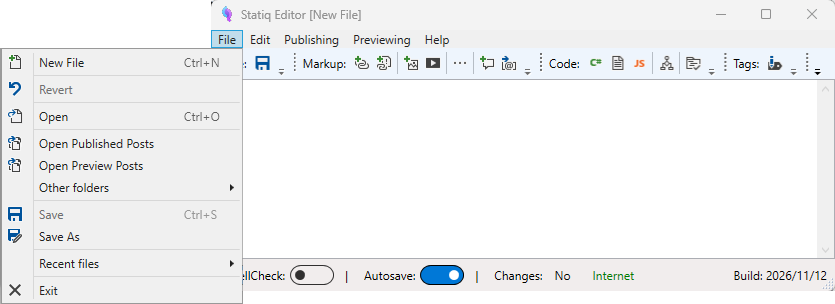
For some reason it was showing up right-aligned rather than the usual left-aligned.
But extra oddly, other applications I had open were not doing this. Visual Studio. The Godot editor. The Edge browser. All of them rendered their menus "normally".
Investigating
url copied!
Since this editor is something I hacked together myself to make writing easier, my first thought was that I'd broken something in the code myself. But looking back through the commit history for the last month or so, I could see I'd changed nothing on the editor app's UI. So that wasn't likely to be the cause.
Next up, I was aware that I'd recently rebooted after installing the release version of .Net 11 and a big old round of Patch Tuesday updates. But running the same version of my code on my work laptop (which also had those changes) showed normal menu placement - which tended to rule out that being the cause.
So, as is the modern fashion, I tried asking VS Copilot about the issue. I gave it a fairly detailed question about what might cause a WPF app's menu's to appear right-aligned. It's answer focused on the XAML
FlowDirection
property as being the thing that controlled this behaviour. That did not seem likely to me - as I'd not changed this in the solution, and the issue did not appear on my other computer which was running the same code. Unsurprisingly when I did set this property for the menus, the result was not the same as the problem I was seeing:
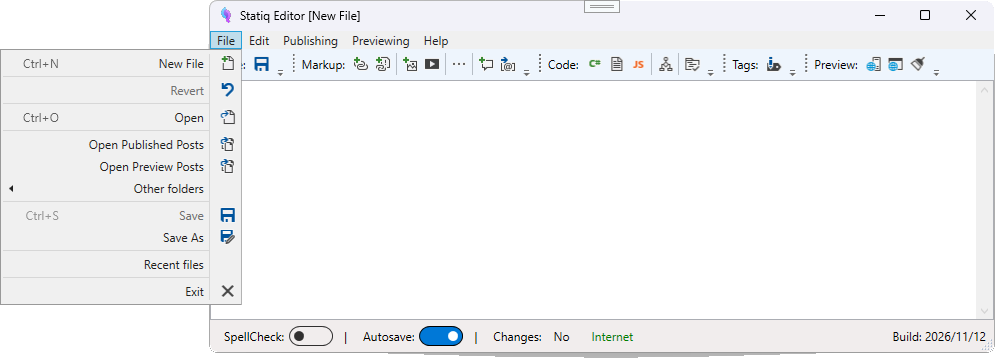
It's changed the alignment of the rendered text as well as the dropdown itself, and has not fixed the menu alignment.
Hitting upon a solution
url copied!
It took me a while to work it out, but the breakthrough here was that I needed to be searching for what might cause any Windows App to display its menus oddly - not specifically a WPF app. I'd not tried that initially because of the odd behaviour of my app being broken, but other apps being fine. But when I tried searching more broadly, I came across the following nugget:
Windows sets this behaviour based on the OS-level preference for "Choose which hand you write with" (originally designed for Tablet PCs so a user's hand doesn't block the menu). If Windows is configured for left-handed use (or if the system flag gets flipped), WPF pop-up menus and dropdowns align to the right side of their header.
And suddenly a light came on in my head. The day before, I'd plugged a drawing tablet into this laptop, and it had installed some drivers and asked some questions I'd boredly clicked through.
Further digging said that this handedness setting is controlled by a registry setting at
HKEY_CURRENT_USER\Software\Microsoft\Windows NT\CurrentVersion\Windows\MenuDropAlignment, where the value
1
means "user is right handed, make menus pop right aligned". And when I looked at this value it was indeed set to
1. Answering the installer's question accurately (I am right handed) set a setting that made it look odd for apps which respected the configuration.
Returning it to
0
and rebooting fixed my issue, and menus went back to normal.
Not entirely sure why this was an issue for my custom-built app, but not for the commercial apps I'd run. I'm going to guess some combination of "old setting that's not respected by all modern code" or "there's a way to ignore this setting in an app's code or config". But at least it was fixed...
A caveat
url copied!
One thing I note here, is that this is a wholly different issue to another thing I've seen where sometimes menus will pop up oddly located when you have an app dragged across multiple monitors in Windows. Especially if the monitors have different settings. (like a laptop and an external screen with different DPIs) For example, as I write this I can cause this oddity by dragging my editor app to the right spot between between two monitors:
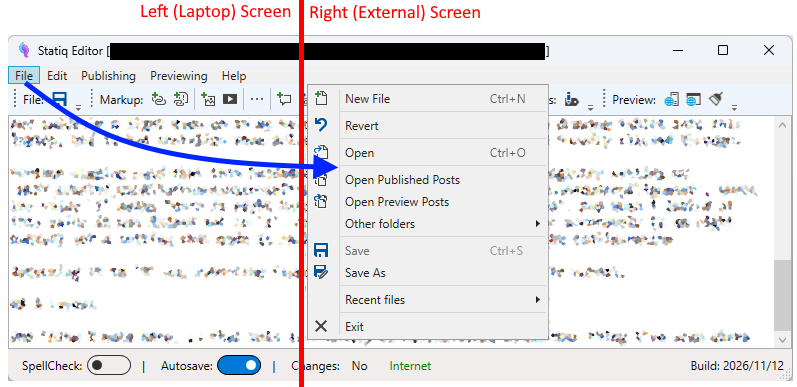
That is not related to handedness settings, as it seems to behave oddly no matter what way the menus are supposed to pop up. I think here Windows has some rules about not letting a popup appear across two windows, so it moves it to an unexpected place to ensure it's wholly on one screen.
↑ Back to top