I found a fun new variation on the "Windows Server Essentials client can be tricky to install" problems I've had in the past recently. To help me remember for next time, here's the issue I saw this time...
I got a new home laptop recently, so have had the fun of formatting it to get rid of all the factory-installed nonsense and install a fresh copy of Windows 11. And having finished that, I got on with installing the WSE client so I can automate backups of my files on the new machine. Since it had been a long time since I'd had to do that reinstall last, I forgot about the "disable domain joining" issue I'd had to fix before. But this time it failed in a fun new way which I'd not seen before:
The WSE installer asked what server to connect to, and what credentials to use and tried to connect. But then stopped and sat for some minutes before noping out with a "could not connect" error. But what I noticed after this was that my laptop had somehow lost its wifi connection during this process.
In the Task Bar the Win11 system tray's "show your network sound and battery state" gizmo went from "I'm happily connected to the wifi" to "YOU HAVE NO NETWORK!":

I scratched my head and rebooted - which brought the connection back. But repeating the attempted install caused the same issue again reliably.
Now the overall fix for this was actually "use the registry hack that disables domain joining in the WSE connector" from my previous post. Doing that stopped the wifi problem from occurring when the WSE connector configured itself, and allowed the setup to proceed. But after a while I did realise what was breaking with the networking.
It took a fair amount of messing about to spot what had stopped working. But something that the installer was trying to do did not play nice with the "WLAN AutoConfig" service in Windows 11, and caused it to throw a warning and exit. You could see a record in the
Windows Logs / System
bit of event viewer: (As well as a bunch of "can't join domain!" errors that reminded me about my previous post - but that's not what's interesting here)
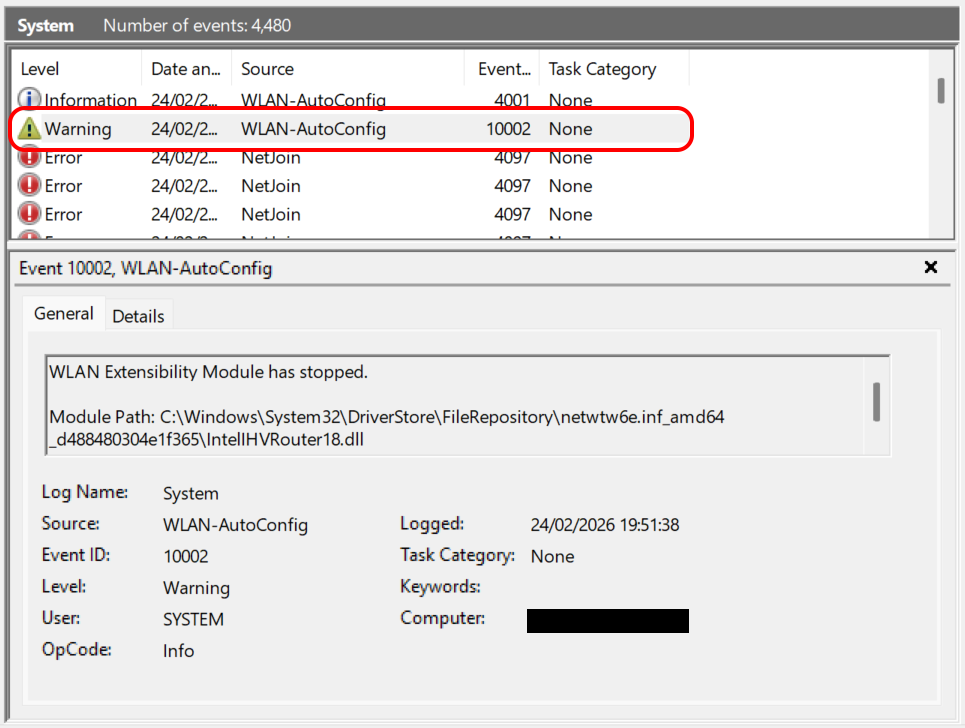
For Google's benefit that says:
WLAN Extensibility Module has stopped.

Module Path: C:\Windows\System32\DriverStore\FileRepository\netwtw6e.inf_amd64_d488480304e1f365\IntelIHVRouter18.dll
And magically if you head off to Services and restart the
WlanSvc
service, the system tray goes back to normal and restores the wifi connection pretty much instantly.
I'm not sure if this is a Windows 11 issue specifically, or it's related to the particular Wifi device on this laptop. For reference it's a
Killer(TM) Wi-Fi 7 BE1750w 320MHz Wireless Network Adapter (BE200D2W)
device
from Intel, using the latest driver from Windows Update.
But it works for me now - and maybe this will help someone else searching for answers in the future...
↑ Back to top