
Following on from a recent "WPF is easy when you know how" post about animations, I bumped into some new fun the other day. By default a WPF textbox has the ability to enable Windows' spelling checker. But if you have a context menu you lose correction suggestions. How can we have both?
The challenge
 url copied!
If you have a
<TextBox/>
element in a WPF page or control you can use the
yourControl.SpellCheck.IsEnabled
property to turn on or off red squigglies for spelling errors. It's not a great feature - the performance is a bit poor on big blocks of text, and it has some rendering invalidation issues when you turn it off again. But it doesn't involve any 3rd party extensions, so it can be useful.
So (as a very basic example) you might have:
<TextBox SpellCheck.IsEnabled="true">
</TextBox>
And when you right-click an error you get a context menu with spelling corrections displayed:
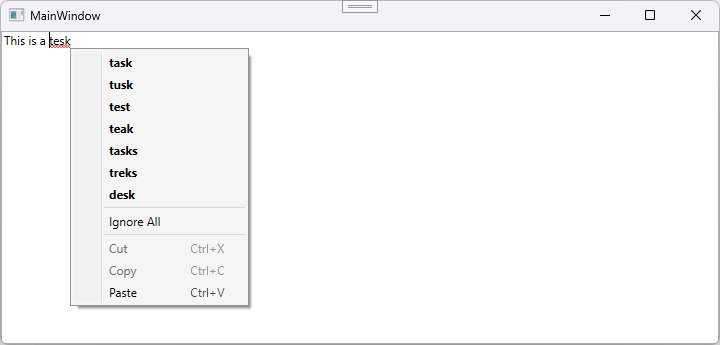
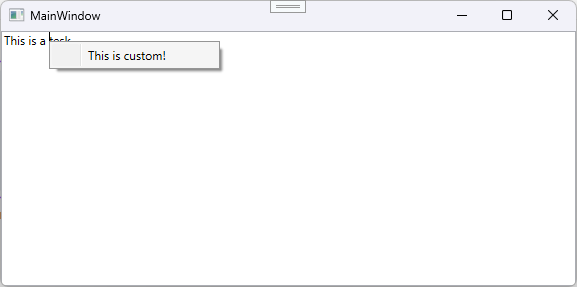
But if you add a custom context menu to your control then this behaviour for right-click on errors stops. WPF doesn't try to do any menu merging or similar. It just sees "the menu is customised" and thinks "nope, no spelling corrections for you!". Adding this:
<TextBox SpellCheck.IsEnabled="true">
    <TextBox.ContextMenu>
        <ContextMenu>
            <MenuItem Header="This is custom!"/>
        </ContextMenu>
    </TextBox.ContextMenu>
</TextBox>
Means you now see your menu, and not the corrections:
So what do we need to do in order to get both?
Fixing this
url copied!
Turns out that the spelling services under the hood of the textbox can give you the same information used to generate that menu, so you're able to modify your menu to add the relevant info. But modifying a menu at runtime needs a bit of thought to avoid the "overwrite" problem the default behaviour has. It could probably work in a couple of ways:
- You insert the spelling options at the top of the context menu (like the default does) but you keep track of what you inserted, and what was the custom menu so you don't remove anything from the custom menu when making changes.
- You push the spelling out to a submenu, where it can control all the content.
The second seemed like the better behaviour to me, as it also helps prevent the context menu becoming too huge if you have lots of custom stuff as well as lots of spelling corrections.
So the custom context menu needs to acquire a top level "spelling" menu item, which should probably be disabled by default. And we need to detect when the menu is being opened:
<TextBox Name="EditBox" SpellCheck.IsEnabled="true" ContextMenuOpening="TextBox_ContextMenuOpening">
    <TextBox.ContextMenu>
        <ContextMenu>
            <MenuItem Name="SpellingMenu" Header="Spelling" IsEnabled="False"/>
            <Separator/>
            <MenuItem Header="This is custom!"/>
        </ContextMenu>
    </TextBox.ContextMenu>
</TextBox>
The code for the menu opening event needs to do the processing of "do we have stuff to put on the context menu" each time. That involves:
- Clear out and disable the spelling menu
- Check if there are currently any spelling corrections under the cursor
- If not, exit
- If so, add each one to the spelling menu and enable it
That can be achieved with something like:
private void TextBox_ContextMenuOpening(object sender, ContextMenuEventArgs e)
{
    SpellingMenu.IsEnabled = false;
    SpellingMenu.Items.Clear();

    var error = EditBox.GetSpellingError(EditBox.CaretIndex);

    if(error != null)
    {
        SpellingMenu.IsEnabled = true;

        foreach(var correction in error.Suggestions)
        {
            SpellingMenu.Items.Add(new MenuItem() {
                Header = correction,
                FontWeight = FontWeights.Bold,
                Command = EditingCommands.CorrectSpellingError,
                CommandParameter = correction,
                CommandTarget = EditBox
            });
        }

        if(error.Suggestions.Any())
        {
            SpellingMenu.Items.Add(new Separator());
        }

        SpellingMenu.Items.Add(new MenuItem() {
            Header = "Ignore All",
            Command = EditingCommands.IgnoreSpellingError,
            CommandTarget = EditBox
        });
    }
}
The
EditBox.GetSpellingError()
call retrieves info about any spelling issues at the specied cursor location. Note that's a single number - if you have your textbox set for multiline it's still just the offset into the text, not a row/column thing. And then the
Suggestions
property on that object returns a list of strings which might be the right word.
So the code adds one menu option for each of those suggestions, and applies the
CorrectSpellingError
command to it. That means when the user clicks the menu option the WPF code magically calls
Correct()
on the
SpellingError
object we got from the cursor position to do the replace for us - taking the
CommandParameter
as the correction to apply.
And to mimic the original menu, if there are suggestions, an
IgnoreSpellingError
command is added to an extra "Ignore all" menu option for completeness.
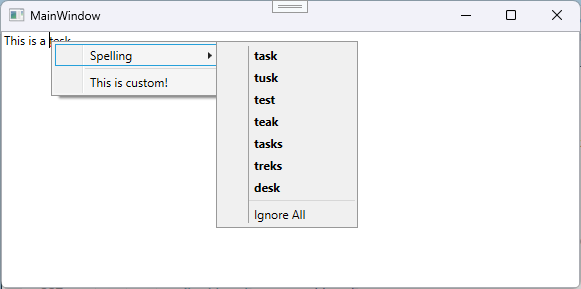
And with that (fairly simple) change, the app now has both the custom context menu and the helpful spelling correction behavior:
If only it could merge menus like that by default...
↑ Back to top